SoundOn
MusicArmed

Taps, holds and more fingers

Eight places. Three gestures each.

Every corner and the middle of every edge holds a tap, a double tap and a hold. That is 24 slots with one finger, and a second set of 24 for two fingers resting together.

Join the waitlistSet it up in the app3 day free trial, then $9 once. macOS 13 or later.
Gesture cheat sheetWhat each place does right now

Double tapMic off

HoldCheat sheet

TapSpotlight

Double tapMute

SlideBrightness

SlideVolume

HoldAim a window

TapPlay and pause

HoldScreenshot

Closes on a click, a key or the next touch.
Eight places, three gestures each.

A tap, a double tap or a hold on a corner or the middle of an edge, and the answer is on screen.
  1. 1The 24 slots
  2. 2Record a gesture
  3. 3Test and tune
  4. 4Ideas and warnings

01of 04

The 24 slots.

Each of the eight places has a tap, a double tap and a hold. Two fingers resting together get a second set of their own.

  • Four corners and the middle of every edge
  • A tap waits a moment when a double tap sits in the same place
  • Two fingers must land together and stay still, so a scroll or a pinch never fires one

Slot 24 of 24two fingers

Bottom right corner

Hold with two fingers resting together

Screenshot of an area
  • TapEmpty
  • Double tapCenter the window
  • HoldScreenshot of an area

Two fingers fire only when they land together and stay still, so a scroll or a pinch never triggers one.

This example fills 20 of 24 slots with one finger and 11 of 24 with two. The rest are yours to choose.

Three gestures in every place.

Choose a tap, a double tap or a hold, with one finger or two, and see what each place can do.

02of 04

Record a gesture.

Do the gesture on your trackpad and Rimline selects that place and opens the action picker.

  • Tap, double tap or hold, with one finger or two, or slide along an edge
  • Nothing runs while it listens
Recorded: bottom right, hold
Ideas for youPicked from the apps on this Mac. Nothing leaves it.
3
Mute your microphone with a double tapYou have FaceTime. One tap away beats finding its mute button. Bottom left corner, double tap.
Play and pause from the middle of the bottom edgeYou have Music. Pause without leaving what you are doing. Middle of the bottom edge, tap.
Show what every gesture does with a holdA card of your trackpad, for when you forget what something does. Top left corner, hold.

Record a gesture. Take an idea.

Show Rimline once, or accept a suggestion made from the apps on this Mac.

03of 04

Test and tune.

Touch the trackpad and see your fingers, the zone under them and what Rimline made of each touch, in plain words.

  • Sliders for hold time, tap length and the double tap gap
  • Sliders for the size of the corners and the edges, and a reset

In the bottom right corner

What Rimline saw
  • Bottom edge, middle, tap: Play and pause
  • Bottom left corner, double tap: Mute the microphone
  • Two fingers landed
  • Bottom right corner, two-finger hold: Screenshot of an area

See what Rimline made of every touch.

Your fingers, the zone under them and the decision in plain words, with the numbers to tune it.

04of 04

Ideas and warnings.

Rimline suggests gestures for empty places, with the reason and the exact gesture. It also tells you when two gestures clash.

  • Up to three ideas, from the apps on your Mac. Nothing leaves it
  • A heads up when a tap sits beside a double tap, and where macOS does the same gesture
  • A gesture cheat sheet shows what every place does right now
Ideas for youPicked from the apps on this Mac. Nothing leaves it.
3
Mute your microphone with a double tapYou have FaceTime. One tap away beats finding its mute button. Bottom left corner, double tap.
  • The reasonYou have FaceTime
  • The gestureBottom left corner, double tap

Your layout

  • Top left cornerTap: Play and pause. Double tap: Mute the microphone
  • Top right cornerDouble tap: Mute the sound
  • Bottom left cornerHold: Hold and aim a window

Heads upTop left corner: A tap waits a moment before it acts, in case a double tap follows. Clear the double tap to make the tap instant.

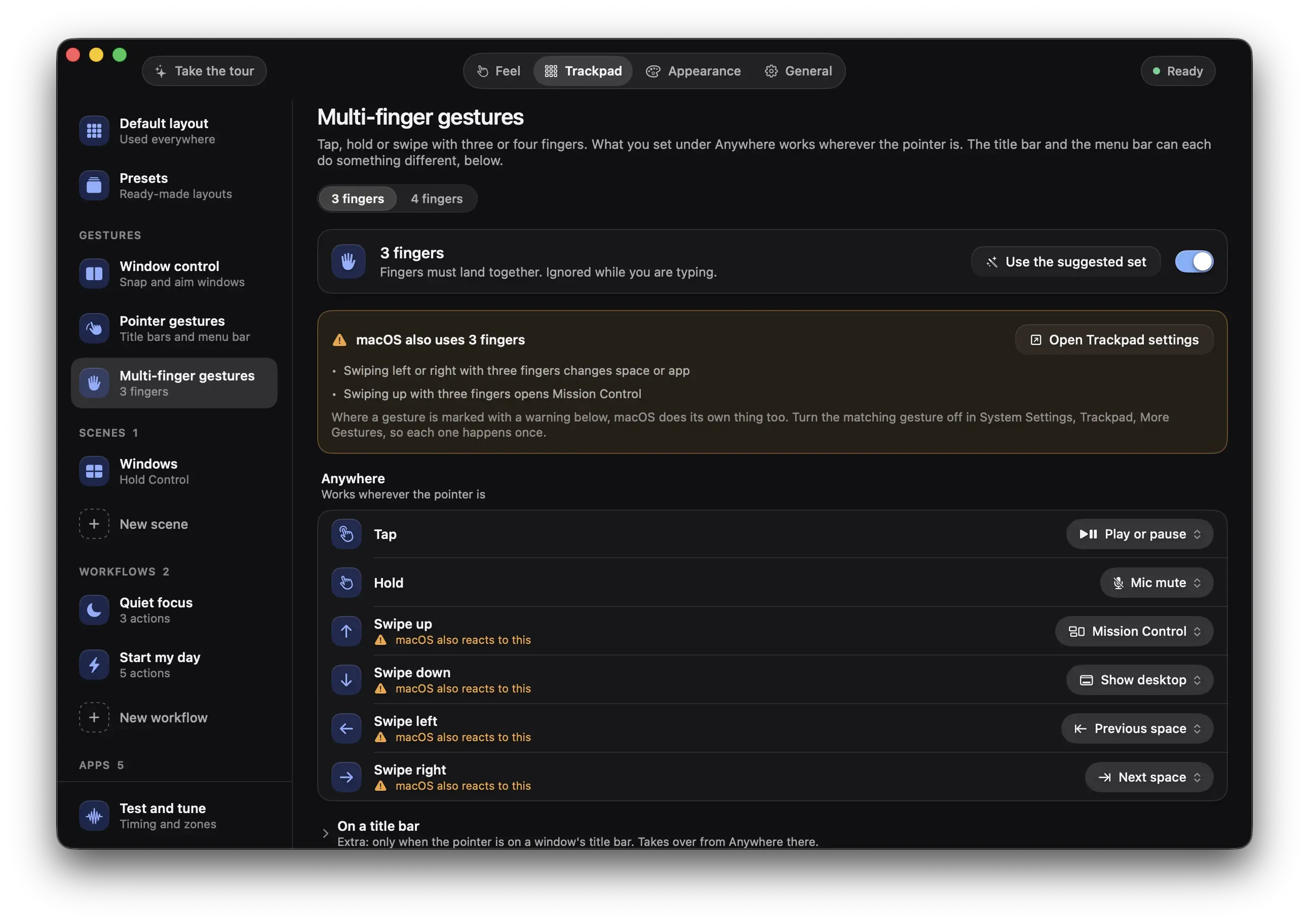
macOS also reacts to thisOn three and four finger gestures, Rimline marks the ones macOS does too, and opens System Settings for you.

TapDouble tap

Top left corner: a tap and a double tap

Added: bottom left, double tap

Ideas, and a heads up before it bites.

Rimline suggests gestures for empty places, and says so when two of yours get in each other's way.

Set it up in the app.

Rimline opens on the page where taps, holds and more fingers lives. Nothing to hunt for.

These buttons talk to the app, so they work once Rimline is installed. Join the waitlist to hear when it opens.

The Rimline window on the Trackpad tab, Multi-finger gestures: three finger actions, with the macOS gesture warnings

Your trackpad has edges. Use them.

3 day free trial, no card, then $9 once. For macOS 13 or later. Drag it to Applications and slide your first edge in a minute.

Version 1.0.0. Apple silicon and Intel. Developed and tested on Apple silicon.